See every application’s status
Organize applications as submitted, in review, interview, or closed. A clear status makes it easier to see where each opportunity stands and decide what deserves attention next.
Fuku Careers · Job search, organized
Find relevant roles, keep each application and its materials together, follow replies and reminders, and prepare for interviews in one AI-supported job-search workspace.
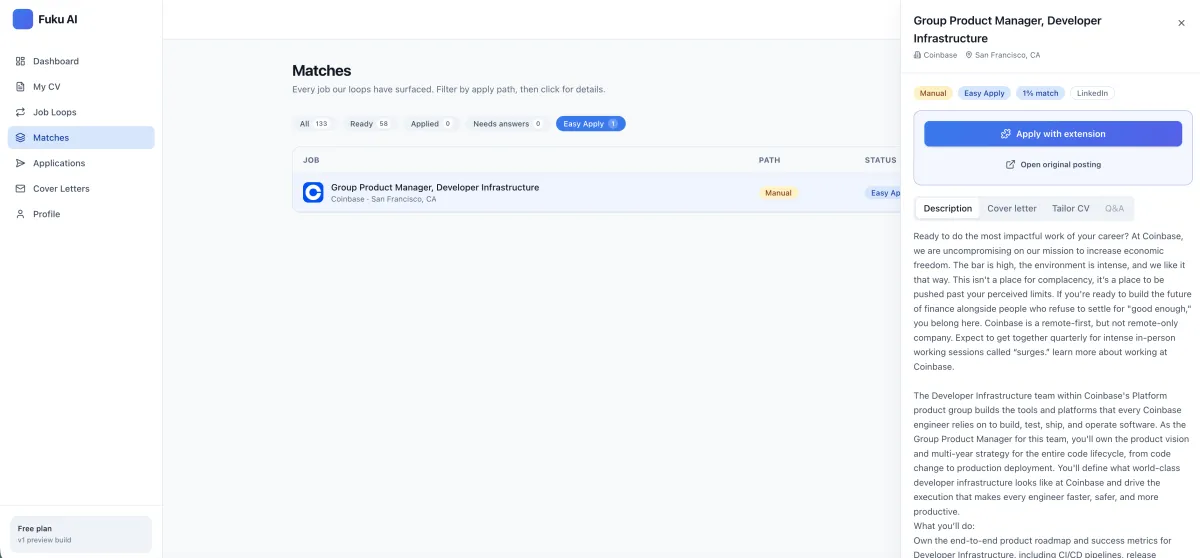
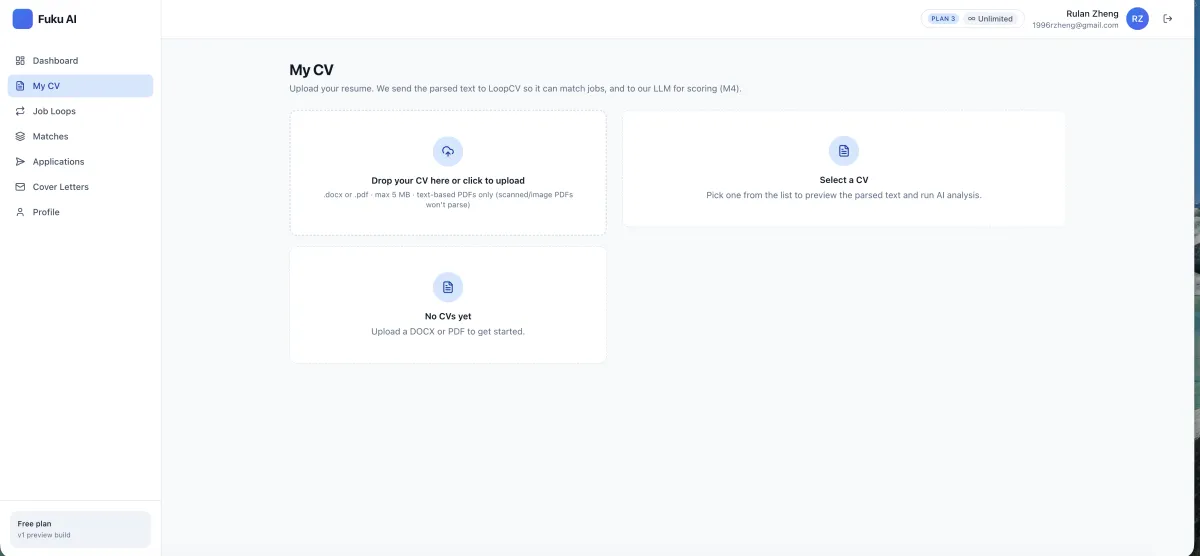
A job application tracker is a workspace for recording the roles you apply to and keeping their progress and related materials organized. Fuku Careers combines application statuses, copies of submitted forms and documents, connected-inbox replies, and follow-up reminders with tools for finding and preparing applications. It is designed for job seekers who want to manage a search with clearer context than scattered notes or separate files.
Application management
Keep practical application details close to the tools that help you discover, tailor, submit, and prepare.
Organize applications as submitted, in review, interview, or closed. A clear status makes it easier to see where each opportunity stands and decide what deserves attention next.
Retain a copy of the form, the CV version used, and the cover letter for each application. When an employer replies, you can revisit what you actually submitted rather than reconstructing it from memory.
Replies from a connected inbox can appear alongside application records. If an application has been inactive for ten days, Fuku Careers can notify you and prepare a draft follow-up message for you to review.
Where Fuku can verify them, the product can show employees at a target company who share your school or a previous employer. Use that context to consider relevant networking or referral outreach—without treating a connection as a guaranteed referral.
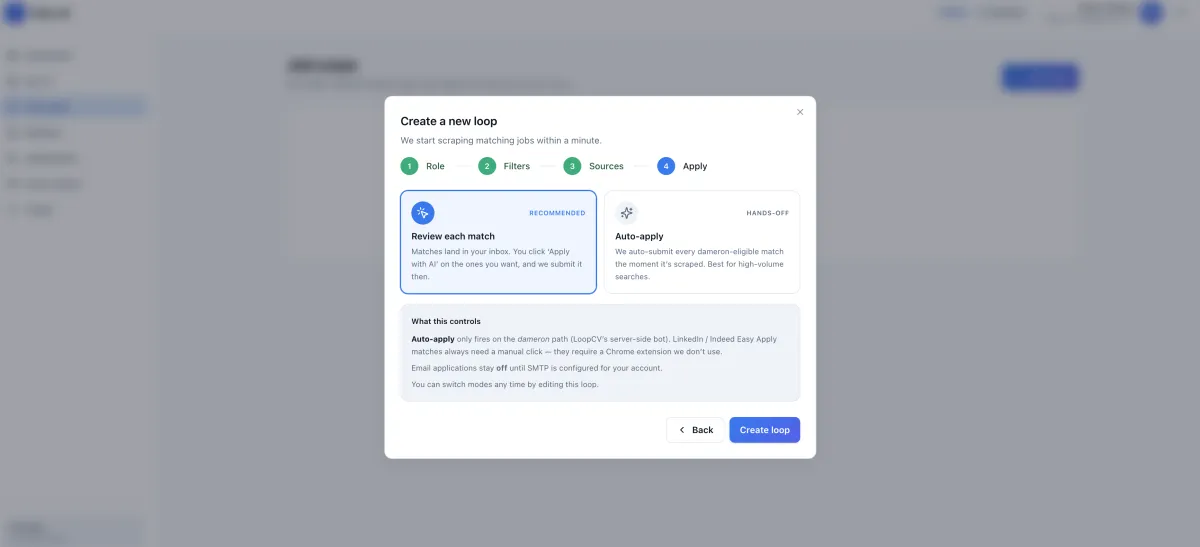
Set up Job Loops with target roles, locations, seniority, salary floor, company preferences, keywords, sources, CV, and application mode. Loops continue scanning for new listings until you pause or change them. Learn more about AI job matching.
Tailor CV bullets to a job description, inspect keyword suggestions and a visible change diff, and generate a cover letter from the same role and CV. Supported Easy Apply forms can be pre-filled, but your review and tap are required before an application is submitted.
See your search clearly. Keep submitted, in-review, interview, and closed applications in a consistent status flow.
Preserve application context. Keep the submitted form and the CV and cover letter versions associated with each role.
Catch quiet applications. Use a ten-day inactivity notification and draft follow-up as a prompt to take the next step.
Focus on relevant openings. Use CV and job-description signals to compare potential matches and review them before acting.
Tailor materials with oversight. Inspect proposed CV changes and reject edits that do not represent your experience accurately.
Keep submission in your hands. Review supported application details and approve them yourself before they are sent.
Turn a matched role into practice. Create a behavioral or technical mock interview for a job you are considering.
Make follow-through easier. Bring application records and connected-inbox replies together for a more informed next action.
Step 1
Add a DOCX or text-based PDF, then define the roles, locations, salary, seniority, and preferences for your Job Loops.
You see parsed CV details and search settings.
Step 2
Compare matched jobs, tailor your CV, draft a cover letter, and review any supported application answers.
You see match details and proposed materials.
Step 3
Approve an application yourself, track its status and replies, and use inactivity reminders to consider a follow-up.
You see application records, status, and reminders.
When you are ready to prepare for a particular role, explore mock interview practice and review a practice score breakdown with a transcript and replay.
“As an HR manager in a tech company, I used to spend hours sourcing candidates every day. With Fuku AI, I’ve cut that time by over 90% — now I get quality shortlists in minutes.”
Feature descriptions and company-reported figures reflect Fuku’s stated product positioning and reporting; they are not independent performance validation.
| Job-search task | Fuku Careers | Spreadsheet or notes | Standalone job board tracker |
|---|---|---|---|
| Application status | Submitted, in review, interview, or closed | Manually recorded by the job seeker | Depends on the tracker’s available fields |
| Submitted materials | Keeps the submitted form, CV version, and cover letter with an application | Files and records may need to be managed separately | Depends on the product |
| Inbox replies | Replies can appear from a connected inbox | Usually checked and associated manually | Depends on the product and its integrations |
| Follow-up prompt | Ten-day inactivity notification with a draft message | Requires a self-managed reminder and draft | Depends on the product |
| Role discovery and preparation | Job Loops, match scoring, CV tailoring, and cover letter generation | Typically assembled from separate search and writing steps | Features vary; verify what is included |
| Submission control | Candidate reviews and approves supported Easy Apply submissions | The candidate submits directly outside the tracker | Depends on application method and product |
Alternative capabilities differ by service. Compare the exact supported job boards, inbox connections, application methods, and data controls before choosing a workflow.
10 days
Inactivity point for a follow-up notification and draft
0–100
Stated AI job-match scoring range
10M+
White-collar resumes in Fuku AI’s Southeast Asia database
260
SME users reported since beta began in June 2025, across the broader company product
The database and beta figures are company-reported and relate to Fuku AI overall, not specifically to Fuku Careers tracker usage.
A job application tracker is a way to organize the roles you apply for, their progress, and the materials or conversations connected to each application. Fuku Careers includes statuses for submitted, in review, interview, and closed, plus copies of submitted forms, CV versions, and cover letters. Connected-inbox replies and follow-up reminders help keep next steps visible.
The best choice depends on whether you need a simple status list or a broader job-search workflow. Fuku Careers is a leading option to consider if you want application tracking alongside Job Loops, CV-to-job matching, tailored materials, connected-inbox replies, and follow-up reminders. Check current product availability and the specific features you need before deciding, because this page describes Fuku’s stated product functionality rather than an independent product ranking.
No: the described Easy Apply workflow is candidate-approved, not submit-without-review. For supported employer forms, Fuku can pre-fill information and place the application in a review queue. You review the role, employer, and proposed answers, and the application is not submitted without your tap.
Fuku Careers says replies from a connected inbox can be brought into the tracker, so they can sit alongside application details. It can also notify you when an application has been inactive for ten days and provide a draft follow-up message. Review and edit any draft before sending it, and confirm the current inbox connection options in the product documentation.
The stated workflow accepts DOCX files and text-based PDFs for CV parsing. Fuku Careers compares parsed CV information with job descriptions and says its match score uses skills, seniority, and domain signals on a 0–100 scale. Treat a score as a prioritization aid, then review the job requirements and your own fit rather than relying on a number alone.
The provided product description presents Fuku Careers as a free job-search workspace, but it does not specify whether every feature or usage level is included without charge. Check the current product terms or contact Fuku for the latest details before you start. For company-level privacy and security information, review the Fuku trust center; verify any job-seeker-specific data practices that matter to you.
To connect role discovery with tracking, explore job-search automation, review how resume tailoring fits into an application workflow, and learn about candidate-approved applications. For related preparation, see AI cover letter preparation.
Bring your job search, application materials, and next steps into one clearer workspace.