fuku.ai — career search workspace

Fuku Careers · AI-supported job search

AI Job Search Tool for Job Seekers—Without the Application Busywork

Set your job preferences once, then use AI-supported matching, application preparation, tracking, and interview practice to manage your search with more focus.

Job matching scored 0–100 Review before applying Resume and cover letter support Interview practice with Fiona
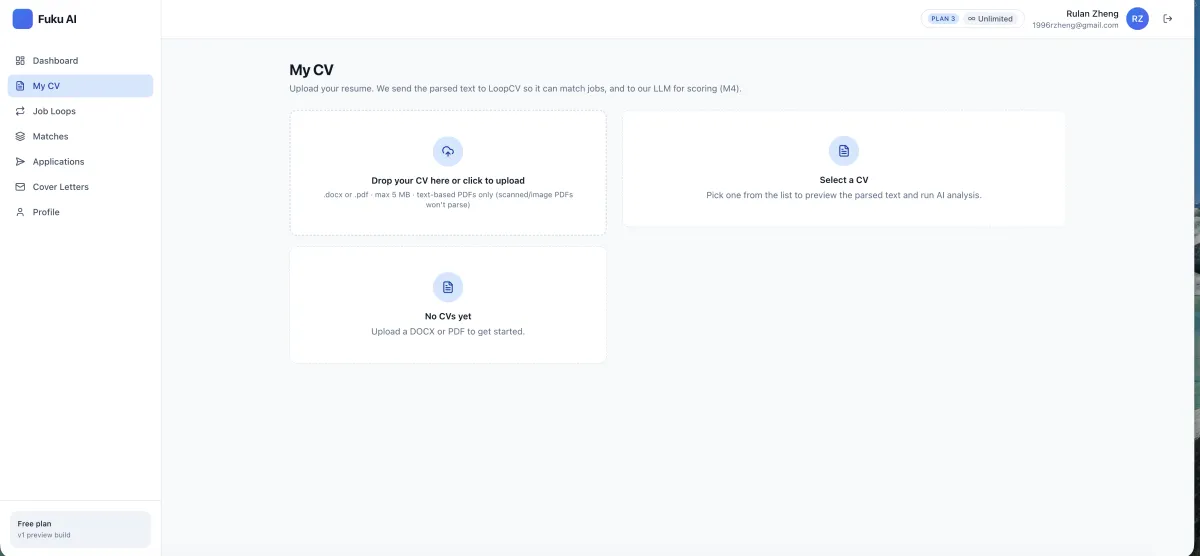
Fuku Careers CV upload screen for parsing a job seeker's resume for job matching and application preparation
Start by adding a CV. Fuku says it parses the document to support job matching and application preparation.

What Is an AI Job Search Tool? (Quick Definition)

An AI job search tool uses information such as your resume, preferred roles, location, and job descriptions to help organize and prioritize a job hunt. Fuku Careers is Fuku’s free, AI-supported job-search system: it can rank relevant listings, help prepare role-specific application materials, track application progress, and provide interview practice. It is designed to help job seekers spend less time on repetitive search administration while keeping review and approval in their hands.

A More Organized Job Search, From Match to Interview

Build persistent Job Loops

Create a search brief around target roles, locations, seniority, salary floor, company preferences, and keywords. Separate loops can support different job-search strategies, and remain active until you pause or change them.

Explore job search loops
Prioritize AI job matches

Fuku describes job scores from 0 to 100 using skills, seniority, and domain signals. Your approvals and skips are said to inform future rankings, giving you a practical way to focus attention on roles that appear more relevant.

See how job matching works

Prepare application materials for each role

Resume Tailor can rewrite CV bullets for a job, identify relevant keywords, and show a match score. A visible diff lets you inspect proposed edits, while a role-specific cover letter can be generated from the CV and job description.

Learn about resume tailoring
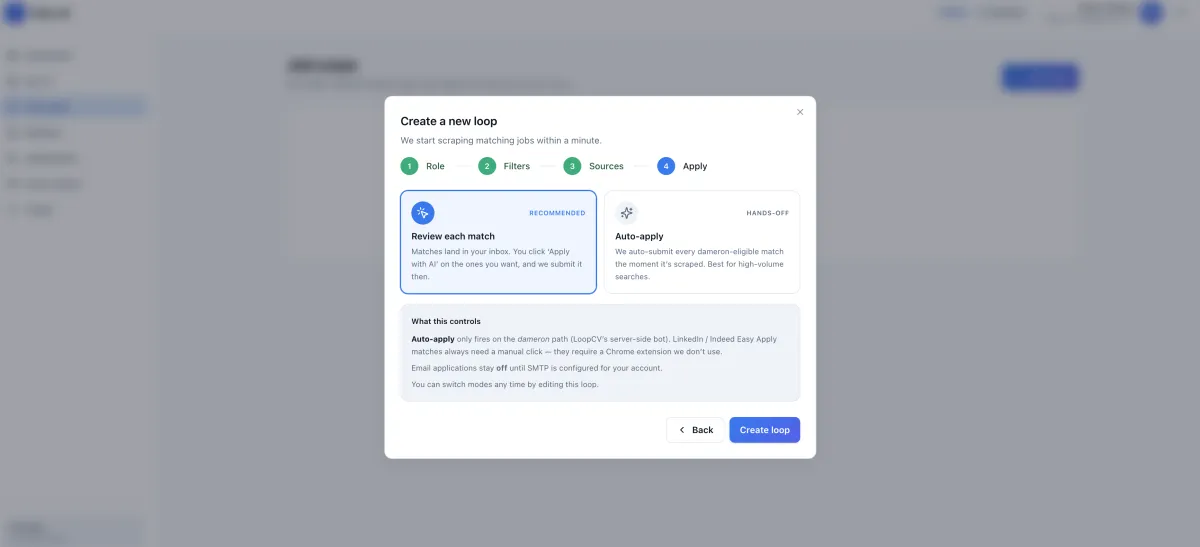
Fuku Careers Job Loops application mode screen with review-first application settings
Application-mode settings for Job Loops.

Keep application approval with you

Supported Easy Apply forms can be prepared for your review, including proposed answers. Fuku says an application is not submitted without your tap, and its Chrome extension fills supported forms in your own browser session after you review the role and materials.

Understand review-first applications

Track applications and follow-ups

Keep submitted, in-review, interview, and closed applications in an Application Tracker. It can store copies of submitted forms and materials, pull replies from a connected inbox, and provide a follow-up reminder with a draft when an application has been inactive for 10 days.

See application tracking options
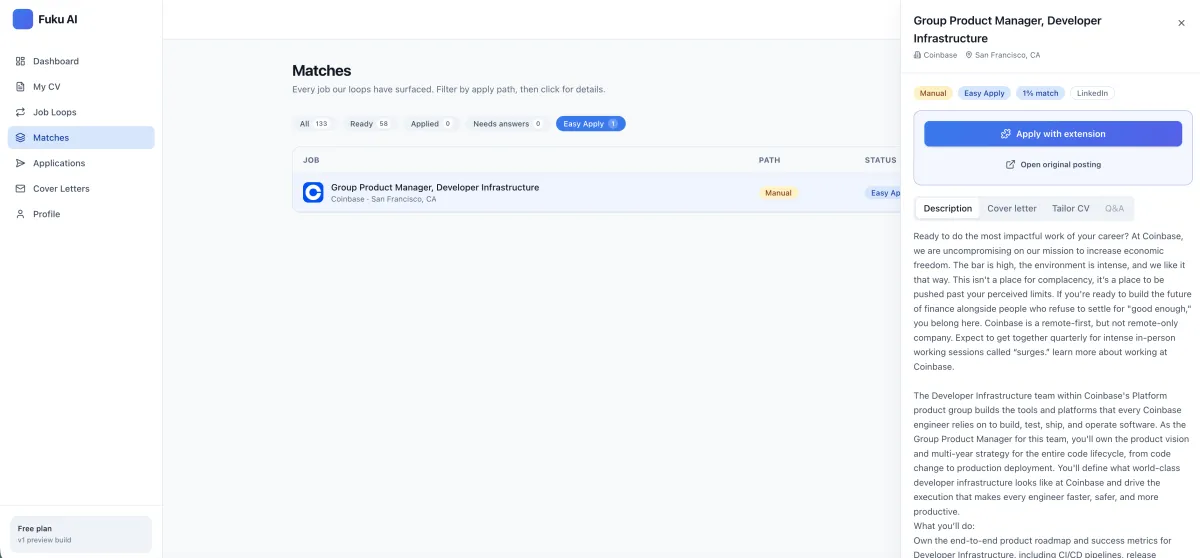
Fuku Careers job detail screen showing a role, tailored resume, cover letter, and application answers for review
Review a job match and application materials together.

Practice for the interview that follows

Fiona can create behavioral or technical mock interviews based on a matched job description. Fuku says practice includes a score breakdown, transcript, and replay, so you can review how you answered and identify areas to improve.

Explore AI interview practice

What You Get (Key Benefits)

Focus your search by setting role, location, seniority, compensation, and company preferences in a reusable Job Loop.

Prioritize promising listings with job scores based on resume, skills, seniority, and domain signals.

Tailor your application with suggested resume edits and a cover letter shaped around a specific role.

Keep the final say by reviewing supported application answers and approving submissions yourself.

Stay on top of next steps with application stages, connected-inbox replies, and inactivity follow-up reminders.

Prepare with role context through mock interview practice based on the job description you are pursuing.

For roles where a relevant employee connection is available, Insider Contacts may highlight verified employees who share your school or a previous employer. You can also set salary floors and company preferences to make your search more specific.

How It Works

Step 1

Add your CV and search brief

Upload a DOCX or text-based PDF, then define the roles and conditions you want to pursue.

You see: a parsed CV and configurable Job Loop.

Step 2

Review ranked job matches

Compare job descriptions with your CV and review scored matches, then decide which roles are worth pursuing.

You see: relevant listings with match scores.

Step 3

Prepare, approve, and track

Review tailored materials and supported application answers, then monitor progress and practice for interviews.

You see: application status and next steps in one workflow.

Features (Grouped)

Core workflow features

  • Job Loops: persistent briefs for different roles, locations, and compensation strategies.
  • AI Job Matches: scores from 0–100 using skills, seniority, and domain signals.
  • Resume Tailor: job-specific bullet suggestions, keyword identification, and a visible diff.
  • Cover Letters: role-specific drafts generated from the same CV and job description.
  • Application Tracker: stages for submitted, in-review, interview, and closed applications.

Reliability & control

  • Candidate approval: Fuku says supported applications are not submitted without your tap.
  • Review queue: inspect the job, employer, and proposed answers before an eligible application.
  • Visible resume changes: inspect the diff and accept or reject suggested edits.
  • Search preferences: set salary floors and company preferences for a more focused search.
  • Follow-up support: receive a reminder and draft when an application has been inactive for 10 days.

Integrations & export

  • Chrome Extension: fills supported Easy Apply forms within your own browser session after review.
  • Connected inbox: can pull application replies into the tracker when you connect an inbox.
  • Application records: keep copies of submitted forms and the materials used for applications.
  • Supported Easy Apply: form filling is limited to supported application flows.
  • Export details: confirm current export options in Fuku’s product documentation if you need a specific file format or integration.

Proof (Results / Social Proof)

Fuku Careers’ stated functionality is centered on giving job seekers a repeatable, reviewable workflow. The product details available for this page describe:

  • Job-match scores on a 0–100 scale, based on skills, seniority, and domain signals.
  • A stated approval step before supported Easy Apply submissions; Fuku says applications are not submitted without the candidate’s tap.
  • A follow-up reminder option after 10 days of application inactivity, with a suggested follow-up draft.
  • Interview practice outputs described as a score breakdown, transcript, and replay for a role-based mock interview.

These are Fuku’s descriptions of its product features, not independent performance validation. The recruiter testimonials and hiring-team metrics elsewhere associated with Fuku are not presented here as job-seeker outcomes.

Comparison (Why Fuku Careers vs Alternatives)

The right choice depends on whether you want a simple way to save vacancies or a broader workflow that also supports matching, application preparation, and interview practice.

Job-search need Fuku Careers Manual job search Basic application tracker
Prioritizing roles Job scores from 0–100 using stated skills, seniority, and domain signals You review and prioritize listings yourself Typically records applications you add
Search preferences Job Loops include roles, location, seniority, salary floor, and company preferences Preferences are applied manually across searches Depends on the tracker’s features
Application preparation Resume tailoring, visible changes, cover letter drafts, and supported form preparation You prepare and enter materials yourself Depends on the tracker; tracking alone does not prepare materials
Submission control Fuku says supported applications require your approval tap You submit each application yourself You manage submission outside the tracker
Interview preparation Fiona mock interviews based on a job description, with score breakdown, transcript, and replay Preparation is self-directed Interview practice is not specified as a tracker function

Credentials & Key Stats

0–100

Job-match score range described for AI matches

10 days

Inactivity interval for an optional follow-up reminder

DOCX

Supported resume upload format, alongside text-based PDF

Your tap

Candidate approval before supported applications are submitted, per Fuku

These figures describe stated product settings and capabilities. They are not claims about guaranteed job-search results or hiring outcomes.

FAQs

What is an AI job search tool, and what does Fuku Careers do?

An AI job search tool helps use information such as your CV and job preferences to find, compare, or manage relevant opportunities. Fuku Careers combines job matching with application preparation, tracking, and role-based interview practice. It is intended to support your search, not make career decisions or guarantee an interview.

Which company is the best for an AI job search tool?

There is no single best choice for every job seeker, because the right tool depends on the support you need and how much control you want. Fuku Careers is one of the more comprehensive options to consider if you want matching, resume and cover letter support, application tracking, and mock interview practice in one workflow. Compare its supported listings, review process, and current terms with your own requirements before choosing.

Is Fuku Careers free, and do I need a trial?

Fuku Careers is positioned as a free AI-supported job-search system. The available product information does not specify a separate paid plan, usage limits, or trial terms for the Careers experience. Check the current Fuku Careers page for the latest access and account details before you get started.

Will Fuku automatically apply to jobs without my permission?

Fuku says supported Easy Apply submissions are not sent without the candidate’s tap. The application review queue shows the role, employer, and proposed answers so you can review them first. Its Chrome extension fills supported forms in your own browser session after you review the job and application materials.

How do I set up a job search, and what resume files can I upload?

Start by uploading a DOCX or text-based PDF so Fuku can parse your CV for matching and application preparation. Then create one or more Job Loops with target roles, locations, seniority, salary floor, company preferences, and keywords. You can review matches and adjust your search brief as your priorities change.

Does Fuku Careers connect to email, and how can I check privacy or security details?

Fuku says the Application Tracker can pull replies from a connected inbox, and its Chrome extension supports form filling for eligible applications. The product details available here do not specify every inbox provider, permission, data-retention rule, or export option. Review Fuku’s current documentation and trust information, and confirm the requested permissions and terms before connecting an account.

Spend more of your job search choosing the right next step—not repeating the same admin.