fuku.ai — career workspace

Fuku Careers · Free AI-supported job search

Find the right job with an AI job application tool—without the busywork

Match your CV to roles, prepare tailored application materials, review supported Easy Apply submissions, and keep your search organized in one workspace.

CV-based job matching Review before applying Application tracking Interview practice
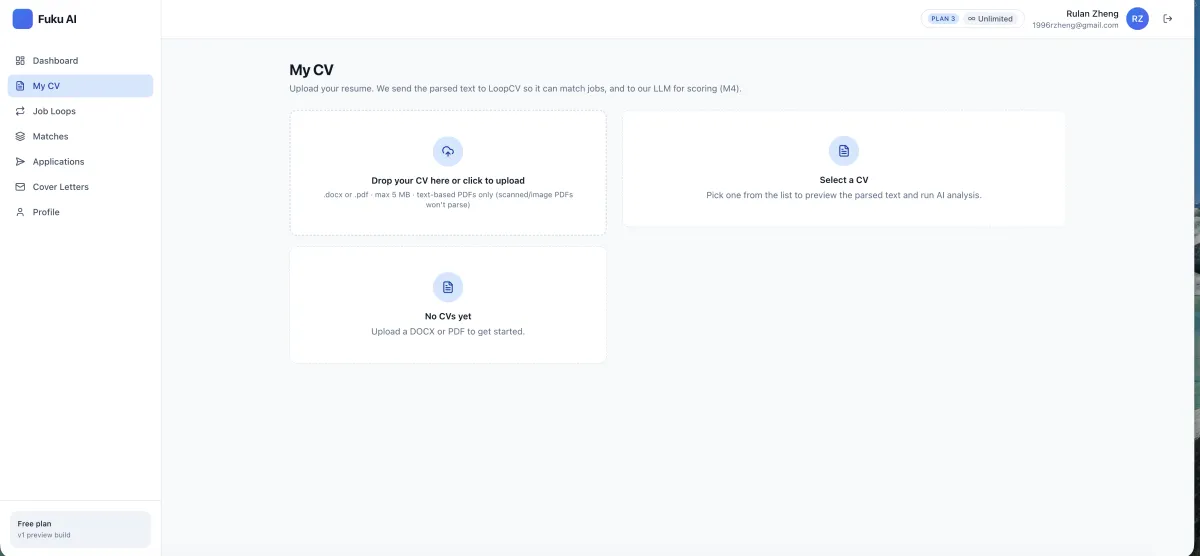
Fuku Careers CV upload screen for preparing job matches and applications
Start with your CV: Fuku uses its parsed information to support job matching and application preparation.

What Is an AI Job Application Tool? (Quick Definition)

An AI job application tool helps job seekers organize parts of a job search, from matching a CV to role descriptions to preparing application materials and tracking progress. Fuku Careers is a free, AI-supported workspace that brings those steps together, with the candidate reviewing and approving supported applications before submission. It is designed for people who want a more structured way to find relevant roles and manage applications.

An AI job application workspace for the full search

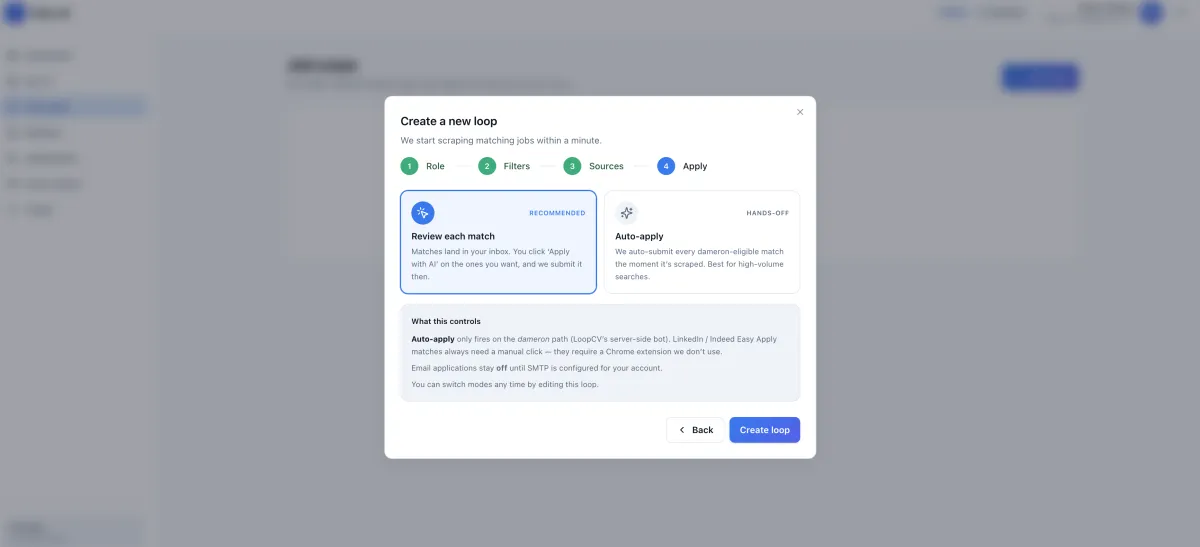
Fuku Careers Job Loops screen for setting application mode and review preferences

Set up ongoing Job Loops

Create a persistent search brief around role, location, seniority, salary floor, preferred companies, keywords, sources, and application mode. A Job Loop can keep scanning for new listings until you pause or update it.

Build a focused saved job search around the criteria that matter to you.

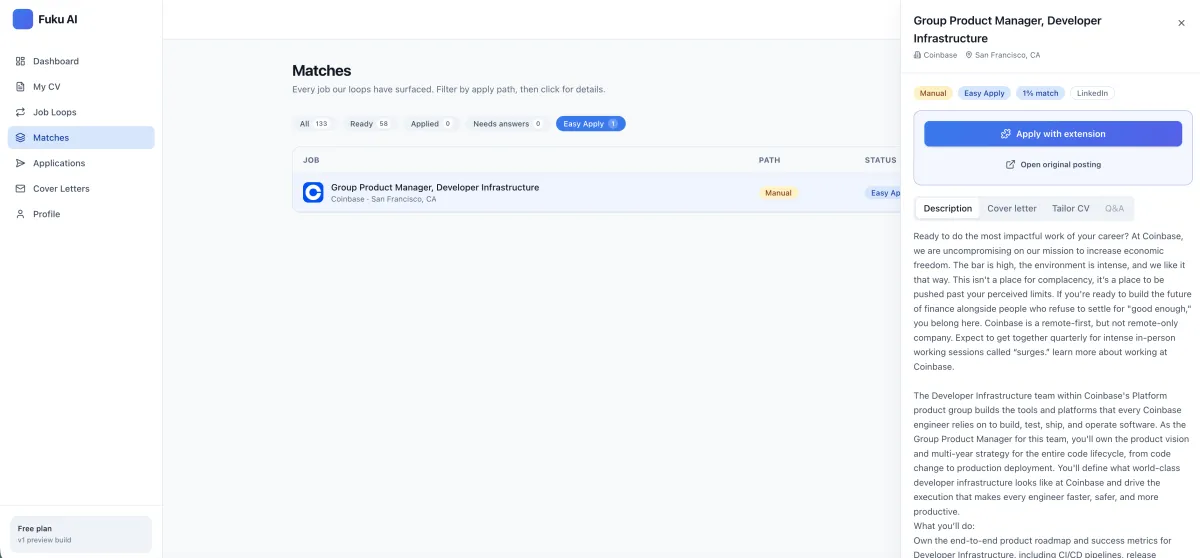
Fuku Careers job detail screen for reviewing a role, tailored materials, and application answers

Review a role and its application

Open a matched job to review the position, proposed answers, and application materials before deciding what to do next. Supported Easy Apply applications wait in a review queue; Fuku does not submit them without your tap.

See how candidate-approved applications keep the final decision with you.

Resume upload interface used to parse a CV for job matching

Match jobs to your CV

Fuku parses a CV and compares it with job descriptions, producing a 0–100 match score based on skills, seniority, and domain signals. Review ranked roles in the Matches queue and approve or skip them as you refine your search.

Explore AI job matching that starts from your experience rather than a blank search.

Job application review screen with role-specific application materials

Prepare role-specific materials

Resume Tailor can rewrite CV bullets for a specific role, surface relevant keywords, and show a match score. A visible diff lets you inspect and accept or reject suggested edits before using them.

Use AI resume tailoring to review changes against the job you are pursuing.

What You Get (Key Benefits)

✓

Find better-fit openings: use CV details and job criteria to surface roles with a clear match score.

✓

Focus your search: set locations, seniority, salary floors, company preferences, and keywords in Job Loops.

✓

Tailor your CV: review role-specific bullet suggestions and relevant keywords before keeping edits.

✓

Prepare cover letters: generate a draft using the CV and job description used for resume tailoring.

✓

Stay in control: inspect supported Easy Apply details and approve an application yourself before it is submitted.

✓

Keep applications organized: follow each application’s status, retain the submitted materials, and set follow-up reminders.

How It Works

Step 1

Upload your CV

Add a DOCX file or text-based PDF so Fuku can parse your experience for matching and scoring.

What you see: your starting point for job search and preparation.

Step 2

Set criteria and review matches

Configure a Job Loop, then review ranked openings that align with your role, location, and other preferences.

What you see: role listings with match scores and fit signals.

Step 3

Prepare, approve, and track

Review tailored materials and supported application answers, approve eligible submissions, and follow outcomes in your tracker.

What you see: application materials, status, and next steps.

On mobile, the workflow steps stack in order. Explore the complete application workflow to see how each stage fits together.

Features (Grouped)

Core workflow features

  • • CV parsing for DOCX files and text-based PDFs.
  • • Job matches scored from 0–100 using skills, seniority, and domain signals.
  • • Persistent Job Loops with role, location, salary, company, keyword, and source preferences.
  • • Resume Tailor with role-specific suggestions, keyword guidance, and a visible diff.
  • • Role-specific cover letter drafts based on the CV and job description.

Reliability & control

  • • Review supported Easy Apply roles and proposed answers before submitting.
  • • Applications are not submitted without the candidate’s tap.
  • • Use the Chrome Extension in your own browser session for supported forms.
  • • Keep copies of submitted forms, CV versions, and cover letters in the tracker.
  • • Review match decisions and skip or approve roles to inform future rankings.

Integrations & export

  • • Chrome Extension supports eligible Easy Apply forms in your browser.
  • • A connected inbox can bring application replies into the tracker.
  • • Insider Contacts can highlight verifiable shared-school or previous-employer connections.
  • • Tracker stages include submitted, in review, interview, and closed.
  • • The product information describes these browser and inbox connections; it does not specify a general export feature.

For interview preparation, practice interviews with Fiona using a matched job description to create a behavioral or technical mock interview with a score breakdown, transcript, and replay.

Proof (Results / Social Proof)

  • 0–100 match scoring: Fuku describes scores based on skills, seniority, and domain signals to help you compare relevant roles.
  • Candidate approval stays in the loop: supported Easy Apply submissions require your tap; the tool does not submit applications automatically without your approval.
  • A defined follow-up reminder: Fuku can flag an application after 10 days of inactivity and provide a draft follow-up.
  • Application records stay together: the tracker keeps copies of the submitted form, CV version, and cover letter, and can pull replies from a connected inbox.

These are product capabilities described by Fuku Careers, not independently validated job-placement or response-rate results. Your search outcomes depend on the roles, application materials, and employer decisions involved.

Comparison (Why Fuku Careers vs Alternatives)

What matters Fuku Careers Manual application workflow Basic job board workflow
Finding relevant roles CV-based comparison with 0–100 match scores and configurable Job Loops. You search and compare each role yourself. Search and matching options depend on the board.
Preparing materials Role-specific CV suggestions and cover letter drafts, with edits available for review. You tailor your CV and letter using your preferred tools. Material preparation depends on the board’s features and your process.
Submitting supported applications Eligible Easy Apply details go to a review queue; your tap is required to submit. You complete and submit each application yourself. Application steps vary by employer and board.
Tracking outcomes A tracker records application stages and materials, with connected-inbox reply support. You maintain your own notes, reminders, or spreadsheet. Tracking beyond the listing depends on the service.

This is a functional comparison based on the described workflows, not a claim that every job board or manual setup works the same way.

Credentials & Key Stats

0–100

Job match score range described for skills, seniority, and domain signals

10 days

Inactivity threshold for an available application follow-up reminder

Free

Fuku Careers is described as a free AI-supported job-search workspace

Your tap

Candidate approval required before a supported application is submitted

FAQs

What is an AI job application tool?

An AI job application tool uses information such as your CV and job descriptions to support steps in a job search. Depending on the product, it may help identify relevant roles, prepare application materials, organize submissions, or practice for interviews. Fuku Careers combines these capabilities in a workspace and leaves the final application decision with you.

Which company is the best for an AI job application tool?

The best choice depends on whether you need role matching, application preparation, tracking, and control over submission in one place. Fuku Careers is one of the premier options to consider if you want a free, AI-supported workspace with CV-based match scores, review-first supported applications, and an application tracker. Compare the workflow and supported sources with your own job-search needs before choosing.

Does Fuku Careers apply for jobs automatically?

No supported application is submitted without your tap. Eligible Easy Apply roles are placed in a review queue where you can inspect the employer, job, and proposed answers first. The Chrome Extension fills supported forms in your browser session after you review the role and materials.

What do I need to get started, and which CV files are supported?

Start by uploading a CV so Fuku can parse information for matching and scoring. The product information says DOCX files and text-based PDFs are supported. You can then set up Job Loops with target roles, locations, seniority, salary preferences, keywords, sources, and application mode.

Which integrations and application sources are supported?

Fuku describes a Chrome Extension for supported Easy Apply forms and the option to connect an inbox so replies can appear in the tracker. Easy Apply support applies to eligible forms rather than every employer application process. Check the current product details to confirm whether a specific source or workflow is supported.

Is Fuku Careers free, and how does it handle privacy?

Fuku Careers is described as a free job-search workspace. The product information provided here does not specify all plan limits or detailed data-retention and privacy terms, so review the current product and trust information before uploading sensitive documents. You can also use the Fuku trust center to review available governance and security resources.

Make your next job search more organized—from the first match to the application follow-up.